How to Redeem Stick Battles Codes
The COD_ menu, exact paste rules, and why a “working” code still fails.
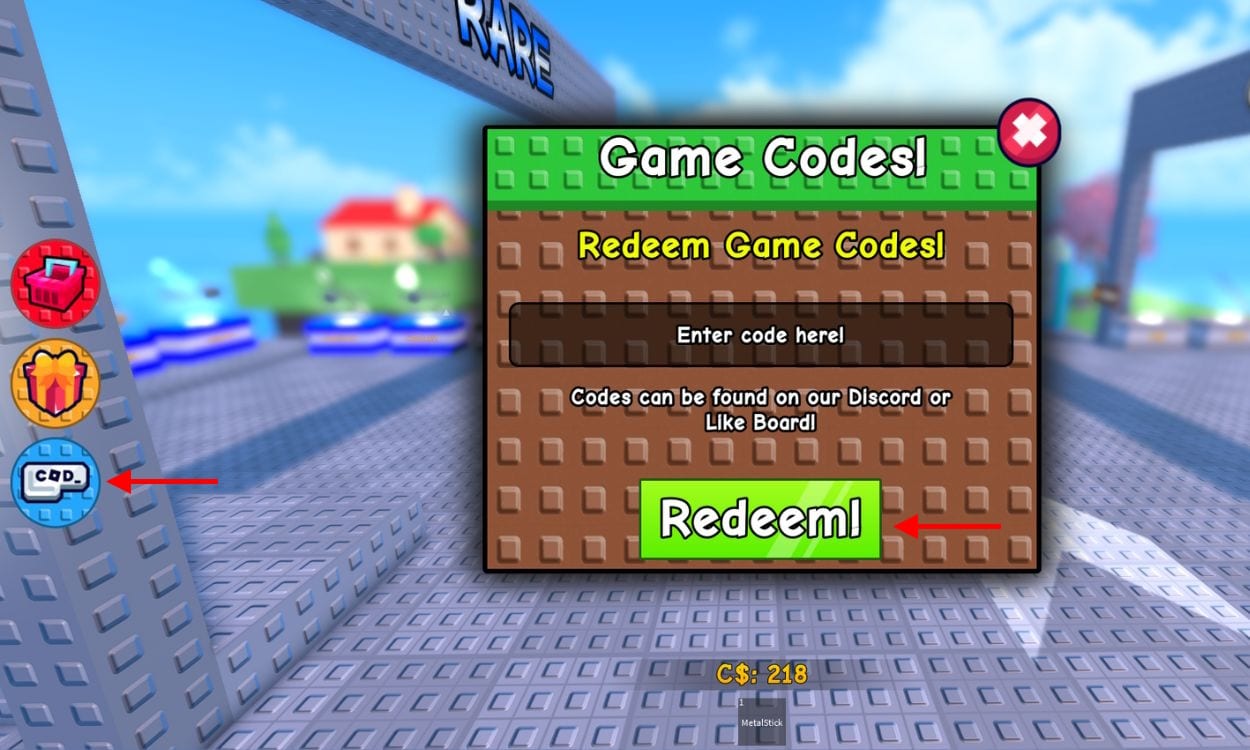
Stick Battles codes only redeem inside a live server. There is no website box, no Roblox catalog field, and no group-wall claim. You join the experience, wait for the kebab HUD, then open COD_ on the left. This page is the full path plus the failure cases that burn most new players. Grab strings from the working codes list before you start so you paste once.
Before you open the menu
Load the official Stick Battles page so you do not land in a Slap Battles clone. Wait until your character is in the arena and the left toolbar is visible. If you mash COD_ during the spawn fade, the box can swallow input and look “broken.” Rejoin if the toolbar never appears — private or lagging instances sometimes skip UI.
You do not have to join Discord to type a code. Discord is only how you hear about new strings. The redeem box belongs to the game. Premium and Friend Boost do not change whether a code works; they only change Credits you earn after.
Step-by-step redeem
- Spawn and wait for the HUD.
- Click COD_ on the left edge. Older Sportskeeda copy said right; the live button is left.
- Click the Enter code here! field.
- Paste one code. Do not add spaces before or after.
- Click Redeem!
- Read the result toast. Success grants Credits, Stars, a Star Potion, or a Shield immediately.
- Repeat one code at a time. Stacking two strings in one box always fails.
If the toast says the code is invalid, stop. Check expired codes before you assume a typo. If it says already redeemed, you are done with that string on this account. Codes are once per user, not once per server.
Why a listed code fails
Hidden spaces from messy copy-paste are the usual killer. Paste into the box, delete any trailing gap, redeem again. Case matters: 50Mil is not 50mil, NYAN is not Nyan. Some milestone codes (THANKYOU8600, THANKYOU900) already expired even though they still circulate on old blogs.
Server desync is next. If Redeem does nothing, leave and join a new instance. Badge sticks and potions sometimes need that same rejoin to show up — the badge guide repeats this because Midas and Tsunami unlocks fail the same way.
A third failure is redeeming before the round UI finishes. The code remote is not ready while you are still falling into the map. Wait one fight, then open COD_.
Mobile, console, and PC differences
On mobile, the COD_ icon can hide under the jump button on small screens. Rotate to landscape or pinch the HUD. On console, highlight the left toolbar with the stick, confirm, then use the on-screen keyboard. PC is click-and-paste. None of the platforms use a Roblox Settings code field. If you are hunting that field, you are in the wrong menu.
After rewards land, open inventory. Credits appear as Cash/C$ in some UI labels. Stars sit in their own counter. Potions are consumables. Shields are streak insurance. Spend using getting started and the tier list so the burst of currency actually changes your kit.
What to do with each reward type
Credits: buy a shop stick you will still swing after the potion timer. Movement sticks (Dash, Speedy, Gravity) print more Credits than a joke melee. Stars: bank them toward Mega Star (5,000) unless you are mid-farm and a potion is the better spike. Star Potion Tier 2 is stronger than Tier 1; save stickmas1 for a full 16-player lobby. Shields: hold until you have a streak worth saving. secondchance, savemystreak, freeshield, and stickmas2 are the Shield pack.
After you redeem everything
Close the box and play. Codes are a head start, not a replacement for the skewer loop. Learn stab timing in controls, then push kills toward Midas and Enjoyer with how to win. When a new event ships — Halloween, Stickmas, Gob, NYAN — come back here, then check events for whether the code is tied to a limited map modifier.
If a brand-new string appears in Discord and is not on the codes hub yet, test it once. Valid rewards still follow the same COD_ path. Invalid strings belong on expired codes so the next reader does not repeat your miss.
Frequently Asked Questions
Quick answers to the most common Stick Battles questions.
Do I need Discord to redeem codes?
No. Discord is only for finding new strings. Redeeming happens in the COD_ box inside a live Stick Battles server.
Can I redeem the same code twice?
No. Each code is once per Roblox account. A second try returns an already-redeemed message.
The button does nothing. What now?
Wait for the HUD, then rejoin. The redeem remote often fails if you click during spawn.
Left or right side?
Left. Use the COD_ icon on the left toolbar. Right-side claims are outdated.